
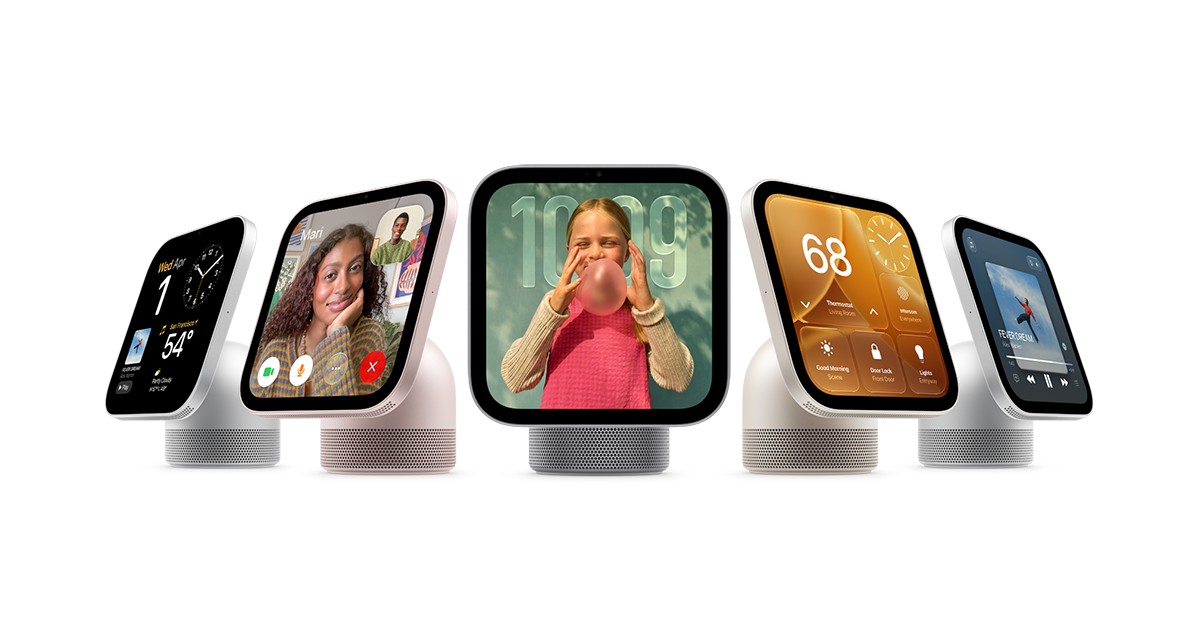
Apple HomeView is Apple’s new shared home display for entertainment, calls and smart-home controls. Apple announced it on October 13, 2026. If you are considering one for a kitchen or hallway, check the phone requirements and mounting costs before comparing the two models.
Price and release date
According to Apple’s launch announcement, the tabletop HomeView and HomeView (Wall Mounted) each start at $299 in the United States, with availability beginning November 13, 2026. Preorders are open in the initial launch markets.
The wall-mounted model needs separate mounting hardware. Apple lists Schneider Home USB-C and AC-wired mounts from $59.95 and $79.95 respectively; a $129.95 Power over Ethernet mount is planned for early 2027. Apple says HomeView is not currently offered for sale in the European Union. Check the regional store before ordering.
Which iPhone or iPad do you need?
Apple’s technical specifications require an iPhone running iOS 27.2 or later, or an iPad running iPadOS 27.2 or later, plus Wi-Fi internet access. The display uses an A18 chip, a 7-inch Liquid Retina panel and a 12-megapixel Center Stage camera.
The tabletop version includes its USB-C cable and 30W power adapter. The wall-mounted model requires a compatible mount, cable and power adapter purchased separately. Both need wired power, so decide where the cable will run before choosing a location.
How personal apps work on a shared screen
Apple’s HomeView product page describes a display that recognizes up to six users. Personal content requires the recognized user’s paired, recently unlocked compatible iPhone or iPad to be present. An Apple Intelligence-compatible paired device is needed for Siri AI features that use personal context.
Built-in tools include Messages, Calendar, Reminders, FaceTime and Home. Apple also lists supported audio and video apps available through iPhone. This does not establish that every iPhone app can be installed or used on HomeView: confirm support for the particular service you want.
What to check before buying
- Confirm your paired device can run the required software.
- Check language and regional availability for the features you expect to use.
- Budget for power and mounting accessories, especially for the wall model.
- Confirm compatibility with your smart-home accessories and media services.
This is a guide to Apple’s published launch information, not a hands-on review. For more iPhone software research, explore our App Store rankings and app details.
Information checked October 15, 2026. Prices above are US list prices. Product image: Apple.