
App profile
Source: Apple App Store
Final Cut Pro: Create Video
Tell stories that move
Apple
App Store overview
Mac · United StatesFinal Cut Pro is now part of Apple Creator Studio, an amazing collection of Apple’s most powerful creative apps designed to help you bring your ideas to life. The suite includes Final Cut Pro, Logic Pro, Pixelmator Pro, Motion, Compressor, and MainStage — plus premium content and intelligence features in Keynote, Pages, Numbers, and Freeform, all in one simple plan. Final Cut Pro combines revolutionary…
- Size
- 6.5 GB
- Category
- Photo & Video
- Compatibility
- Requires macOS 26.6 or later.
- Languages
- English and 9 more
- Age Rating
- 4+
- Version
- Version 12.4
Inside the app
Screenshots


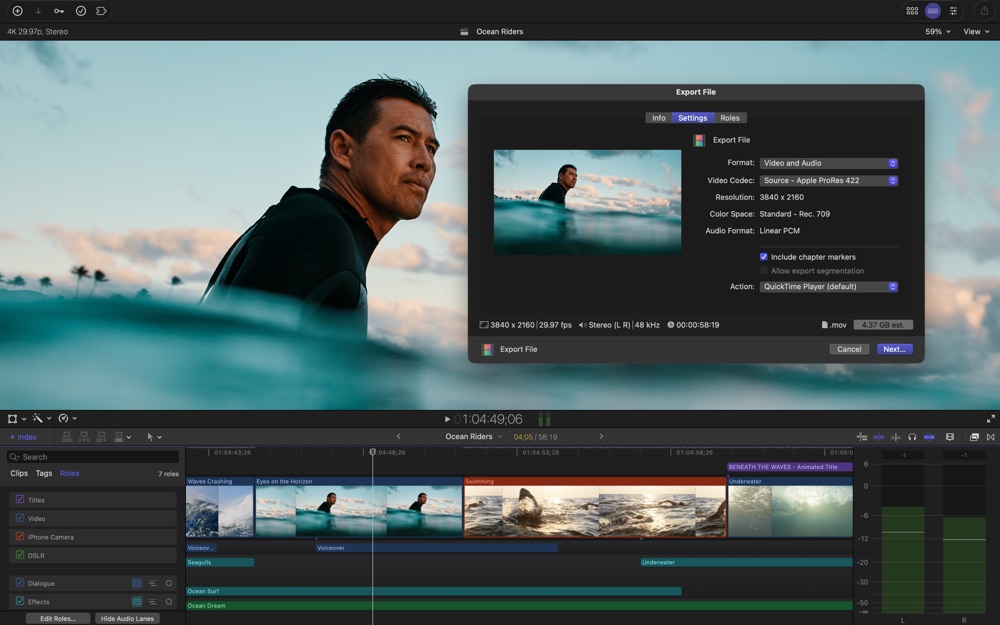
Scroll to explore. Select a screenshot to open the full image. Official artwork is supplied through Apple and belongs to the developer.
From the developer
About this app
Final Cut Pro is now part of Apple Creator Studio, an amazing collection of Apple’s most powerful creative apps designed to help you bring your ideas to life. The suite includes Final Cut Pro, Logic Pro, Pixelmator Pro, Motion, Compressor, and MainStage — plus premium content and intelligence features in Keynote, Pages, Numbers, and Freeform, all in one simple plan.
Final Cut Pro combines revolutionary video editing with powerful media organization and incredible performance to let you create at the speed of thought.
Revolutionary Video Editing
• The Magnetic Timeline uses advanced metadata and Clip Connections for faster, easier editing
• Generate Captions uses AI to create closed captions or animated subtitles in the timeline by analyzing spoken audio
• AI-powered Magnetic Mask automatically tracks and isolates people, objects, and shapes in any footage
• Automatically transform projects for square or vertical delivery with Smart Conform
Powerful Media Organization
• Organize your work within libraries for efficient media management
• Apply custom keywords or favorites on the fly as you select clip ranges
• Intelligent search tools make finding the perfect soundbite or visual simple and fast
Incredible Performance
• Unrivaled speed and efficiency with optimizations for the latest generation of Apple silicon
• Work with a broad range of formats including ProRes, ProRes RAW, RED, XAVC, AVCHD, Avid DNxHR®, Avid DNxHD®, H.264, HEVC, and more
Compelling, Customizable Effects
• Beautifully animated, easily customizable 2D and 3D titles
• Change the look of titles, transitions, and effects using intuitive controls
• Choose from an ecosystem of third-party FxPlug plug-ins with custom interfaces
Integrated Audio Editing
• Assign roles during import to easily track and organize your project
• Expand and edit multichannel audio files directly in the timeline
• Apply audio effects and reduce background noise to isolate vocals using powerful plug-ins and technology from Logic Pro
Intuitive Color Grading
• Powerful color wheels and curves for precise adjustments with keying and masks
• Automatically tone-map clips to match HDR or SDR color space
• Take advantage of ProRes RAW video shot on iPhone 17 Pro or later for even more grading flexibility
One-Step, Optimized Output
• Incredibly fast export for playback on Apple devices and upload to platforms such as Instagram and YouTube
• Export audio stems and multiple versions of a finished video using roles metadata
• Import and export XML for third-party workflows like color grading and sound mixing
System Requirements: macOS 26.6 or later, 8 GB of memory (16 GB recommended), Metal-capable graphics card (Intel-based Mac computers only), 7.2 GB of available disk space. Some features require a Mac with Apple silicon. Some features require internet access; fees may apply.