
App profile
Source: Apple App Store
Clash - Rule Based Proxy
Native Rule Based Proxy Tool
Open Sourced
App Store overview
Apple TV · United StatesClash is now on tvOS. Add your Clash or mihomo profile URL, choose a node, switch Rule, Global or Direct mode, and inspect live connections. Clash - Rule based proxy utility is now on tvOS. Clash is a rule-based network proxy utility. Its core builds on the open-source mihomo project and powers the app's NetworkExtension runtime on Apple platforms. The app is built natively with…
- Size
- 115.6 MB
- Category
- Utilities
- Compatibility
- Requires tvOS 17.0 or later.
- Languages
- English and 2 more
- Age Rating
- 4+
- Version
- Version 1.0.18
Inside the app
Screenshots


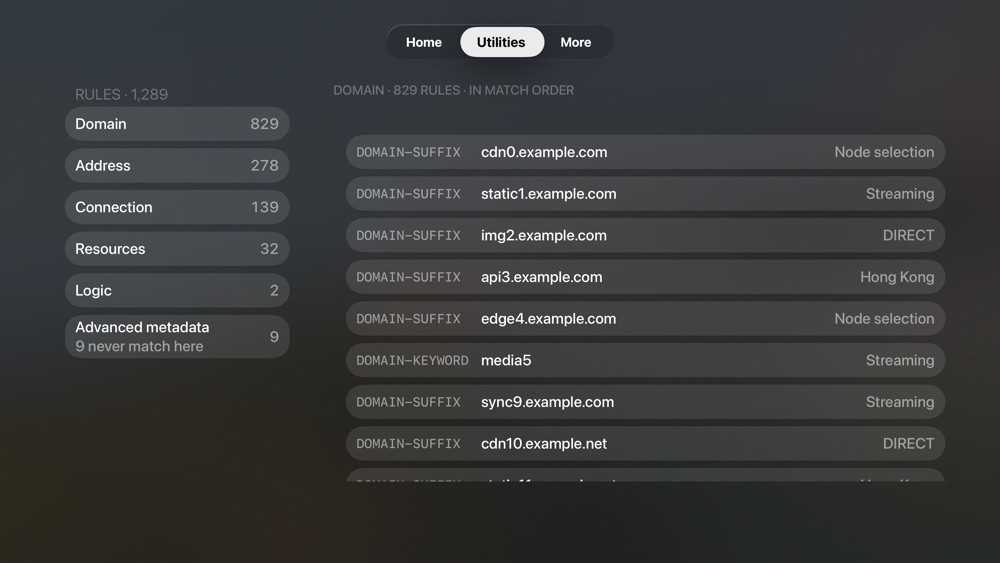

Scroll to explore. Select a screenshot to open the full image. Official artwork is supplied through Apple and belongs to the developer.
From the developer
About this app
Clash is now on tvOS. Add your Clash or mihomo profile URL, choose a node, switch Rule, Global or Direct mode, and inspect live connections.
Clash - Rule based proxy utility is now on tvOS.
Clash is a rule-based network proxy utility. Its core builds on the open-source mihomo project and powers the app's NetworkExtension runtime on Apple platforms. The app is built natively with SwiftUI for the Siri Remote and for viewing from across the room — not a web wrapper and not a port.
Bring your existing Clash or mihomo profile URL to the television. Clash downloads the configuration, applies its rules, and decides how each connection should be handled: direct, through a selected proxy, or rejected. Clash ships with no servers and no proxy lines; you supply your own configuration or profile URL.
GETTING STARTED
1. Add — enter a profile URL with the Apple TV keyboard, or on your nearby iPhone when the system keyboard appears there.
2. Choose — open Nodes, browse policy groups, and select the route you want.
3. Connect — select Rule, Global, or Direct mode, then connect from Home.
RULE-BASED ROUTING
• Rule matches each connection against the active configuration
• Global sends supported traffic through the selected proxy
• Direct connects without using a proxy
NODES AND POLICY GROUPS
• Keep multiple profile URLs and choose which one is active
• Update, rename, or remove a saved profile
• Browse policy groups and their members
• See each group's type, current selection, and the latency reported by the profile's health checks
• Select a member wherever the policy group supports manual choice
A VISIBLE NETWORK
• Home shows connection state, session duration, traffic, current mode, profile, and node
• Connections lists recent activity and filters it by All, Proxied, Direct, or Rejected
• Each connection shows its destination, matched rule, outbound path, and transferred data
• Press a connection for its full chain, source, duration, and what the rule matched on — the numbers keep moving while you watch
• Rules presents the active rule set by category and in match order
• DNS shows the tunnel's configured resolver path
• Diagnostics shows tunnel status, the last problem it saw, memory, geo data, providers, and resolvers
• Providers lists the profile's rule sets and node lists one by one, and whether each one is ready
BUILT FOR APPLE TV
• Connect automatically — once it is on, the tunnel takes over after a restart without opening the app
• Designed for the Siri Remote — every screen is reachable with the directional pad
• Text entry works with the Apple TV keyboard and with the system keyboard on a nearby iPhone
• English, Simplified Chinese, and Traditional Chinese are included
SUPPORTED OUTBOUND PROTOCOLS
HTTP, SOCKS, Shadowsocks, ShadowsocksR, Snell, VMess, VLESS, Trojan, AnyTLS, Mieru, Sudoku, Hysteria, Hysteria2, TUIC, ShadowQUIC, GOST Relay, WireGuard, Tailscale, ZeroTier, SSH, MASQUE, TrustTunnel, OpenVPN
PRIVACY
• No account, sign-in, or registration
• No ads, third-party analytics, or tracking SDKs
• The developer collects no app or VPN data and operates no server that could receive it
• Configurations and credentials are stored on this Apple TV. iCloud restore reads backups saved by your iPhone or Mac in your own Apple account
• Logs and diagnostics remain on this Apple TV unless you choose to share them
• Network traffic flows only between your Apple TV and the services you configure
OPEN-SOURCE CORE
The Clash core source is public for audit. Issues are welcome. The core is built on the open-source mihomo project.
To connect, you need a Clash or mihomo configuration and a network service you control or are authorized to use.
Clash source: https://github.com/ProjectClash/Clash
Privacy Policy: https://clash.md/privacy
Terms of Use: https://clash.md/terms
Support and Documentation: https://clash.md/