
As an Amazon Associate, we earn from qualifying purchases.
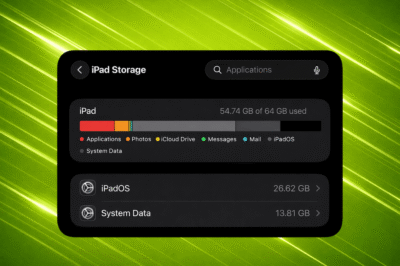
You open your iPhone storage settings expecting to see apps, photos, and videos using most of the space. Instead, you see something else at the top of the list: System Data. And it is huge.
For some users, System Data takes up more space than everything else combined. On smaller storage models, that can make the phone almost unusable.
What Is System Data on iPhone?
iPhone / iPad System Data is a mix of cached files, logs, temporary downloads, update files, and other background data created by iOS. It helps your iPhone run smoothly behind the scenes.
The problem is that sometimes it does not clean itself up properly.
Over time, unused files can build up. Stuck update downloads, leftover game assets, and app cache can all be grouped into System Data. The result is storage that slowly disappears without you clearly knowing why.
Why It Impacts the iPhone Experience
When storage gets tight, your iPhone can start acting strange. You might notice:
- Apps refusing to open
- iOS updates failing
- Messages not loading
- Bluetooth or CarPlay not connecting
- The camera lagging
For a device that is supposed to just work, that feels frustrating. You paid for your storage. You should be able to use it.
On older 64GB models, the issue feels even worse. A large chunk of storage lost to unclear system files leaves little room for photos, apps, or videos.
The Need for Better Control
Right now, iOS does not offer a simple clear cache button for most apps. That means users often have limited control over what is stored under System Data.
A clearer breakdown of what is taking space would make a big difference. Being able to see which files are large, which are temporary, and which can be safely removed would improve the overall iPhone experience.
More transparency would mean fewer surprises and fewer drastic solutions.
What You Can Do Right Now
If System Data is taking over your iPhone:
- Restart your device
- Check Settings > General > iPhone Storage for old iOS update files
- Delete and reinstall very large apps if needed
- Back up your data
- Perform a full erase and restore if the issue does not resolve
A factory reset of your iPhone often reduces System Data significantly, but it should not be the only reliable fix.
Your iPhone is designed to deliver a smooth and simple experience. With better storage management and clearer system controls, that experience can stay fast and reliable instead of cluttered and confusing.
Also take a look at iOS 26.3, as it brings a bunch of under-the-hood improvements.